Core vs Scrivener
The long-form classic, now with AI and research built in
For twenty years, Scrivener has been the default for long-form writing. But AI and research stay outside the app. Core folds a whole-manuscript AI and primary-source bibliographic research into one macOS-native editor — structure tools included.
In brief
Buy-once classic with legendary Compile → Scrivener ($59.99). An AI that has read the whole manuscript and research grounded in real bibliographic data → Core.
Feature comparison
| Axis | Scrivener | Core |
|---|---|---|
| Platform | macOS / Windows / iOS | macOS 15 Sequoia and later (native) |
| Price | $59.99 one-time (macOS) | Pro USD 6.99/mo (14-day free trial) · Max USD 24.99/mo |
| AI | — | Whole-manuscript AI for critique and back-and-forth |
| Research | Research folder; you gather material manually | National library databases — real records only |
| Structure | Binder, Corkboard, Outliner | File tree, corkboard, outliner — three workspaces in one project |
| Publishing workflow | Compile — deep typographic control, industry favourite | DOCX / PDF / EPUB export (no Track Changes) |
| Import | Word, RTF, common formats | Scrivener (.scriv), Word (.docx), Markdown, RTF |
| Export | Compile — PDF, ePub, DOCX, and more | PDF, Word, EPUB |
Core in action
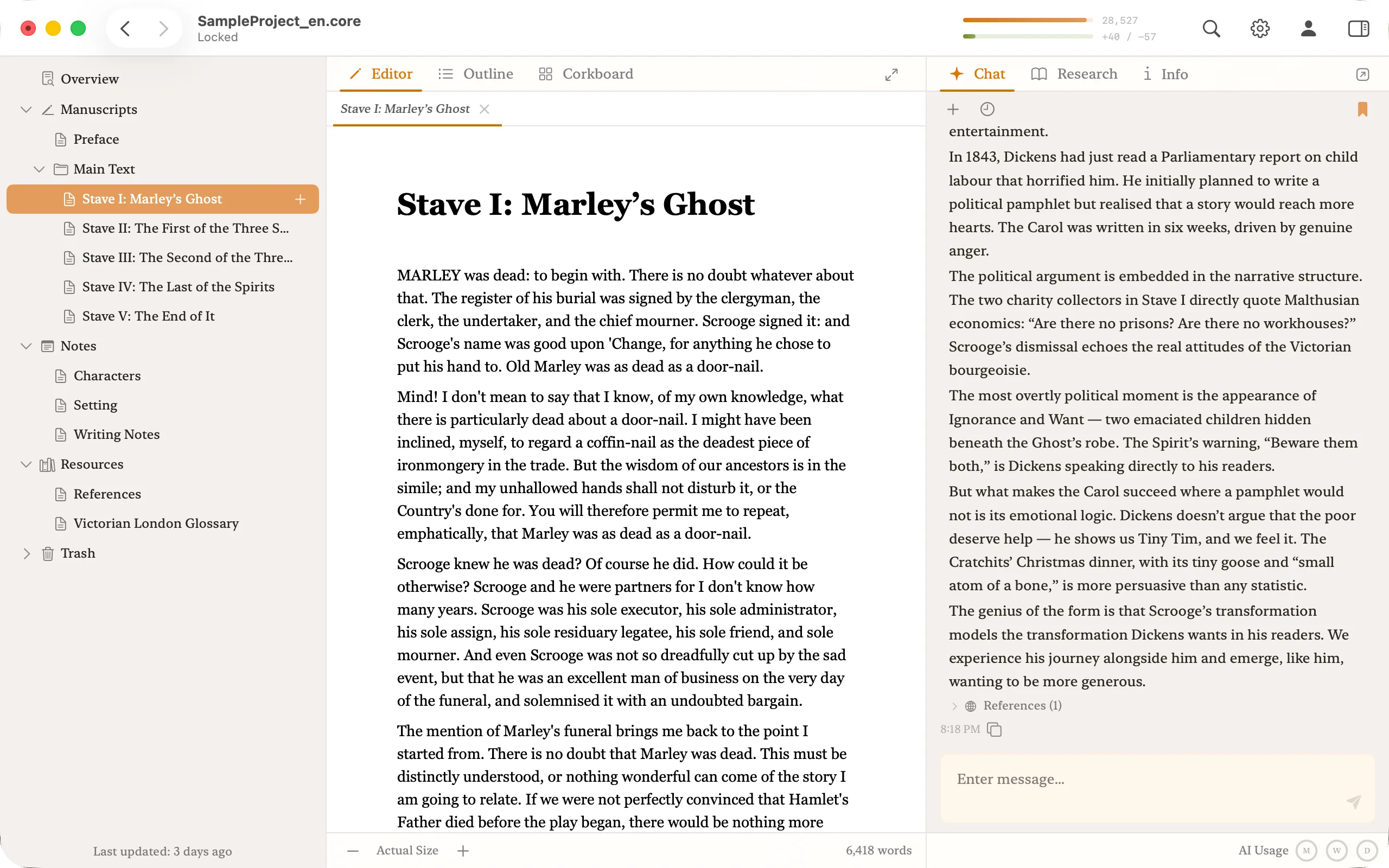
Scrivener's strengths and weaknesses
Strengths
- No subscription. Pay once and keep it.
- Binder, Corkboard, and Outliner give you three views of a long project at once.
- The Compile feature handles ebooks, print, and almost any output format.
- Twenty years of use by novelists, non-fiction writers, and academics.
Weaknesses
- The UI is distinctive — most people describe Scrivener as an app you commit to for years.
- No built-in AI. You end up juggling ChatGPT or Claude alongside it.
- No whole-project AI of any kind, no built-in research connection.
- iOS is a separate purchase and syncs via Dropbox. macOS-first design.
What it means to have AI inside the editor
Scrivener has no built-in AI. If you use ChatGPT or Claude alongside it, every session starts with a ritual: open a new tab, paste in the chapter, re-explain the characters, read the reply, paste it back. The ritual repeats every time you change chapters.
Core's AI starts with the whole project already loaded. Editing chapter 30, you can ask whether a line contradicts the premise in chapter 1 — no copy-paste setup, no re-explanation. The AI is part of the workspace, not a browser tab next to it.
Research and hallucination
Ask a general-purpose AI for sources and you will sometimes get a plausible but fictitious book title, author, or page number. Because Scrivener has no built-in research, the verification is entirely on you.
Core routes research through national library and archive databases — real bibliographic records only, returned directly from authoritative catalogues. The AI never sees anything but real records, so there's no structural room for fabricated citations.
How the pricing shakes out
Scrivener is $59.99 one-time, with no ongoing cost through a major version. Adding AI on top shifts the total. Core consolidates editor, AI, and research into one subscription.
14 days of free trial, enough to feel the difference on your own draft.
Which one to pick
Who Scrivener fits best
Writers who are comfortable with long-form structure tools and are happy to keep AI as a separate app. Anyone who prefers a one-time purchase.
Who Core fits best
Writers who want an AI that has read the whole manuscript, bibliographic research built in, and everything working inside one macOS-native app.
Moving from Scrivener to Core
Core imports Scrivener projects (.scriv), bringing the binder structure and text into Core's manuscript tree. The 14-day free trial is meant for exactly this: try your real work, not a demo file.
You don't have to replace Scrivener entirely. Some writers use Scrivener for planning and compile, and Core for drafting and AI-assisted revision. That works.
A note for bilingual writers
If you also write in Japanese: Core has native vertical writing, ruby, and emphasis dots. Scrivener supports vertical display but not ruby or emphasis dots.
Frequently asked questions
- Does Scrivener have AI?
- No. Scrivener ships without any built-in AI. If you want one, you pair it with ChatGPT or Claude in a separate window, pasting chapters back and forth each session.
- Can I migrate a Scrivener project to Core?
- Yes. Core imports Scrivener projects (.scriv), preserving the binder structure and every word of text. Try the migration on your real manuscript during the 14-day free trial.
- Is Core available on Windows or iOS?
- Not yet. Core is macOS-native today (macOS 15 Sequoia or later). Windows and iOS versions are not on the current release — it is built for focused long-form work on a Mac.
- Is there a Mac app like Scrivener with AI chat built in?
- Core is exactly that — a macOS-native long-form editor built like Scrivener with AI chat folded in. You get a binder-style file tree, corkboard, and outliner for structure, alongside a whole-manuscript AI conversation in the same window. No separate ChatGPT tab, no re-pasting chapters or re-explaining characters every session.
- Is there an app that replaces the Scrivener-plus-ChatGPT workflow?
- Core replaces it. It's a Mac app built like Scrivener with AI chat added inside, consolidating chapter structure and an AI editor that has already read the whole manuscript. Research is grounded in national library catalogues, so the AI never invents citations.
Import your Scrivener project into Core and try it
Bring your .scriv project in and keep writing for the 14-day free trial.